Source: Success in Store: How to Start Or Buy a Retail Business, Enjoy Running It ... by Heard and Woolf.
Wednesday, July 30, 2008
Thursday, July 24, 2008
Sunday, July 20, 2008
DEBUGGING YOUR SQLs WITH A JDBC DRIVER
- Download the SQL Spy from http://sozlux.org/download/p6spy-install.zip.
- Extract the file and copy the spy.properties and spy.jar files to your TOMCAT_HOME/lib directory.
- Edit spy.properties directory and change the real driver to your original driver on the following line
realdriver=com.mysql.jdbc.Driver
- Edit your connection pool settings and use now this driver as your jdbc driver
com.p6spy.engine.spy.P6SpyDriver
Friday, July 18, 2008
How to search and replace text in big files
you can also use sed. I used the following command
perl -pi -w -e 's/search/replace/g;' *.sql
-e means execute the following line of code.
-i means edit in-place
-w write warnings
-p loop
for example you can convert oracle dates to mysql in the following way
Free alternatives to TOAD
If you are using simple SQL functions you do not need to pay full TOAD license to use the ORACLE database. You can find alternatives to toad below :
TOra
from http://tora.sourceforge.net/
TOra has also have a nice exporter. If you want to develop applications at home where you can not install a complete oracle, you can export your tables in tora and import them in e.g. mysql
dbVisualizer
from http://www.minq.se
TADO
from http://tado.sourceforge.net/
Squirrel SQL Client
Wednesday, July 16, 2008
Preparing a JAVA development environment
- Install 7-zip from http://www.7-zip.org/download.html
- Install pspad from http://www.pspad.com/de/
- Download and install JDK 5+ (make sure your JAVA_HOME environment variable points to the JDK, not a JRE). URL: http://java.sun.com/javase/downloads/index.jsp
- For your local environment - download and install MySQL 5.x. ( we will use a central instance later). URL : http://dev.mysql.com/downloads/mysql/5.0.html#downloads
- Set the root password as an empty string by using the following command: mysql --user=root --pass='' mysql -e "update user set password=password('newpw') where user='root'; flush privileges;"
- Download and install eclipse EE from http://www.eclipse.org
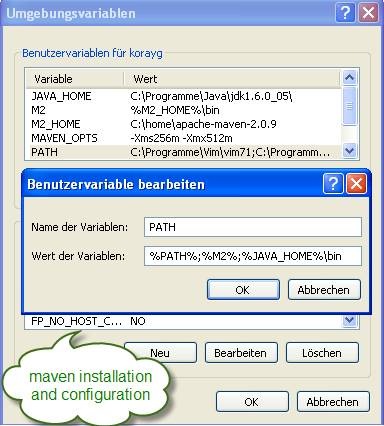
- Download Maven 2.0.5+ from http://maven.apache.org/download.html . Unzip the maven to your home directory and use the following configuration to install the maven.
- Download and unzip tomcat and configure the following environment variables.